
FOBIK Buttons Dead.
One Silver Disc.
Out of Place.
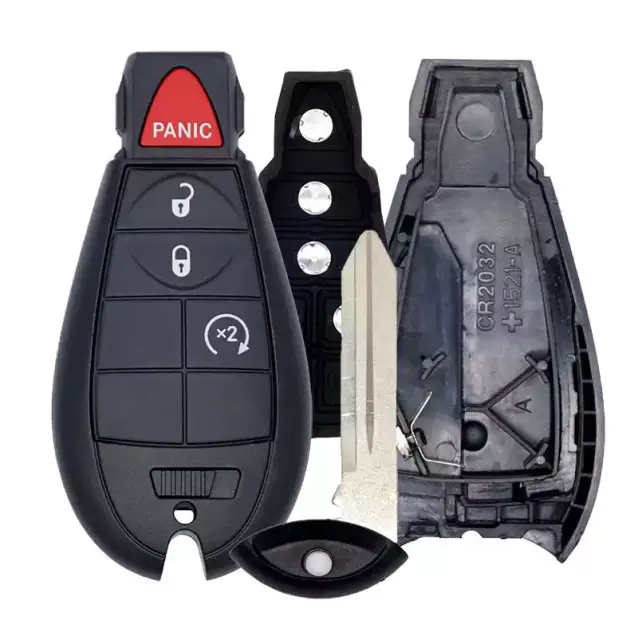
The silver conductive disc inside the rubber pad shifts out of position. The board is fine — it just isn't being reached. New pad and shell, disc back over the gold contact, buttons work again. Same day. No programming.
Local Lock and Key Advice for Rockland County
Weather shifts, travel days, holidays, and season changes expose weak locks, worn keys, cracked shells, and hardware that has been warning you for a while. Handle it before it becomes a public failure.
If something feels rough today, do not wait for the day you are already late.
Three Parts — Only Two Need Replacing
The FOBIK comes apart into three components. Understanding which one fails — and why — explains why the board is always fine and why the repair is straightforward.
FOBIK SHELL
Four silver conductive discs — one per button zone — on the underside of the pad. Each must land precisely on its gold contact pad on the PCB to complete the circuit when pressed.
The silver disc shifts laterally. Still attached to the rubber, but off-centre. Even a millimetre off means it misses the gold pad entirely when pressed. The board is always fine.
New rubber pad — silver discs bonded in factory-correct positions. New shell keeps the pad seated so the discs can't shift again. Board is untouched. No programming.
Silver Must Hit Gold. When It Shifts — Nothing Works.
Cross-section of one button zone. The shell is at the top, rubber dome in the middle, silver disc on the underside, gold contact pad on the PCB below.
- ✕Rubber pad — silver discs shifted out of position
- ✕Outer shell — worn and allowed the shift
- ✕Nothing electronic, ever
- ✓Circuit board — always intact
- ✓Transponder chip and all programming
- ✓Remote ID — no reprogramming needed
- ✓CR2032 battery
Click Your Symptom — Get a Diagnosis
The silver disc on that specific button zone has shifted. Other buttons may still work because their discs are still centred. The board is never the problem.
Rubber pad replacement repositions all discs to factory positions. New shell keeps them there. Same-day walk-in.
Panic gets accidentally pressed more than any other button — in a pocket, against a leg. That disc absorbs more mechanical stress and shifts out of position before the others.
Pad replacement. We check whether the shell is still solid before recommending both components, but typically both are done together.
This is the clearest possible confirmation the board is fine. Squeezing the shell compresses the housing slightly, nudging the pad enough to bring the shifted disc momentarily back over the gold contact pad.
New pad + new shell. If squeezing works, diagnosis is confirmed. Same-day repair. Call ahead to confirm stock.
A disc that's borderline on position shifts in and out of contact as the rubber and shell expand and contract with temperature. Works on warm days, fails on cold mornings.
New pad centres the disc with proper margin. New shell maintains geometry regardless of temperature. Temperature stops being a factor.
If everything stopped simultaneously, check the CR2032 battery first — the most common cause of sudden total failure. Unclip the shell halves and swap the coin cell before anything else.
Replace CR2032 first (free, DIY). If that doesn't resolve it, bring it in — pad and shell assessment is free before we quote anything.
The shell clips wear each time the battery is replaced. When the halves separate even slightly, the rubber pad shifts inside — which physically moves the silver discs off-centre from the gold contacts.
Shell replacement seats the pad correctly. Pad replacement ensures all discs start fresh and centred. Both done together as one repair.
What Happens at Our Spring Valley Shop
We Test the Board First
We open the shell and press each tactile switch directly. In virtually every FOBIK case the switches click perfectly — confirming the board is fine before we quote anything.
Shell Variant Confirmed
FOBIK shells vary slightly by vehicle line and model year. We match the correct replacement shell — button layout, key ring position, and internal clip alignment all verified.
New Pad + New Shell
The circuit board and battery move into the new housing with a fresh rubber pad. Discs are in factory-correct positions. Takes about 15 minutes. Programming is never touched.
Every Button Tested
Lock, unlock, panic, and remote start (if equipped) — all tested against your vehicle. We don't consider the job done until every button clicks and responds correctly.
Frequently Asked
What are the silver circles inside my FOBIK rubber pad?
My FOBIK button stopped working — do I need a new remote?
It works when I squeeze the FOBIK. What does that tell you?
Does FOBIK repair require reprogramming?
Are you open on Sundays for FOBIK repair?
FOBIK Repair — Rockland County
In-store at our Spring Valley location. Call first to confirm FOBIK shell stock for your year and model.
FOBIK Button Dead?
It's a Silver Disc. Out of Place.
Rockland Locksmith sees this repair multiple times a week. New pad, new shell, disc back over the gold contact. Same day. Walk-ins welcome. No programming fee.
Open 24 hours · Sunday through Friday · 274 Old Nyack Turnpike, Spring Valley, NY
